





What is GoodbyeDPI and How to Install It? (VPN-Free Fast Access Guide)
Although VPN programs are usually preferred to overcome access restrictions and Discord login blocks on the internet, this often causes serious drops in internet speed. Stepping in right at this point, GoodbyeDPI offers a free internet experience without losing speed. So, what is GoodbyeDPI, which we hear about frequently lately, and how is it installed on the computer?
What is GoodbyeDPI?
GoodbyeDPI is special software developed to bypass Deep Packet Inspection (DPI) systems used by internet service providers in Turkey. The version shared on this page has been fully optimized specifically for the Turkey infrastructure. Its biggest advantage is that it is not a VPN; thanks to this, it does not create any slowdown, ping increase, or quota drop in your internet connection.
VirusTotal You can access the results from the link below.
Log in to view VirusTotal result
Step-by-Step GoodbyeDPI Installation Guide
You must follow the steps below sequentially and completely for the software to work smoothly.
Phase 1: Configuring DNS Settings
To make the system work properly, you first need to update your computer's DNS addresses:
- Press the Start (Windows) key on your keyboard, type
Runand open the application. - Type
ncpa.cplin the box that appears and press Enter. (This command will open the Network Connections window.) - Double-click the Ethernet or Wi-Fi adapter you are actively using from the list.
- Click the Properties button in the lower-left corner of the new window.
- Find the Internet Protocol Version 4 (TCP/IPv4) option from the list and double-click it.
- Check the "Use the following DNS server addresses" option and enter a reliable DNS address.
- Google DNS: 8.8.8.8 and 8.8.4.4
- CloudFlare DNS: 1.1.1.1 and 1.0.0.1
Cloudflare DNS: 1.1.1.1 and 1.0.0.1
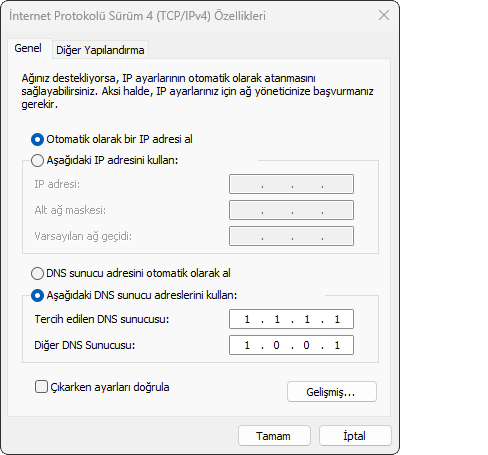
- Close all windows by clicking the OK buttons to save the changes.
Phase 2: Downloading and Running the Software
After completing your DNS settings, you can proceed with the installation of the main program:
- Download the current installation file named goodbyedpi-0.2.3rc3-turkey.zip to your computer.
- Extract the archive you downloaded to a fixed folder that you will not delete or change the location of later.
- When you enter the folder, you need to run the files that will appear according to the internet service provider (ISP) you use:
For Superonline Users:
Right-click the file named service_install_dnsredir_turkey_alternative_superonline from the list and select Run as administrator. Press any key on your keyboard in the black command prompt window (CMD) to confirm the process.
Note: If you cannot get access with this file, you can test the other Superonline files continuing as alternative2, alternative3 in the folder using the same method.
For Other Internet Providers (Türk Telekom, Millenicom, Turknet, etc.):
Right-click the file named service_install_dnsredir_turkey in the folder, use the Run as administrator option, and complete the installation by pressing any key on the screen that opens.
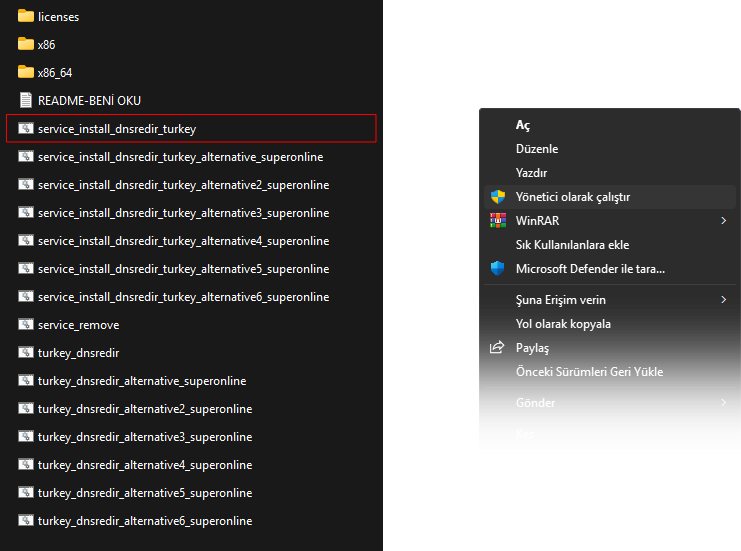
Important Tips and Notes for Users
There are a few subtle details you need to know to use the program efficiently:
- Automatic Startup: Files starting with
service_install_install the software on your computer as a background service. This means the program automatically starts running in the background every time you turn on your computer. - Manual Usage: Files starting with
turkey_dnsredir_only work for that moment. When you restart your computer or close the command prompt window, the system is deactivated. - Uninstallation Process: If you want to completely remove and cancel GoodbyeDPI from your system, it is enough to right-click the file named
service_removein the folder and click "Run as administrator".
COMMENTS (1)
güzel anlatım güzel detay